Dream Angel: A Script Font for Modern Web Design
I was staring at a blank hero section on a new client’s landing page when I realized the layout felt cold. The product was a luxury skincare line, and the existing typography was too rigid, too corporate. It didn’t match the soft, organic feel of the packaging photos. That’s when I decided to test Dream Angel, a romantic handwritten script font from Script Amp. What started as a quick experiment in my design tool turned into a complete overhaul of the site’s visual hierarchy. If you are a web designer or digital creator looking to inject personality into your layouts without sacrificing readability, this typeface might be exactly what your next project needs.
First Impressions in a Digital Context
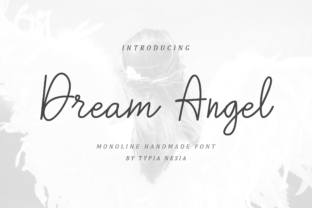
The first thing you notice about Dream Angel is its fluidity. Unlike many script fonts that look like messy scrawls or overly ornate calligraphy, this one has a clean, modern edge. When I dropped it into a large hero headline, it immediately softened the entire page. However, testing a handwritten font on the web requires more than just aesthetic appreciation. You have to consider how it renders on different screens and how users scan content.
In my initial tests, I placed the font over a light beige background with a subtle texture. It looked stunning. But when I switched to a dark mode preview, the thin strokes of the script became hard to read. This is a common pitfall with decorative display fonts. The lesson here is clear: use Dream Angel for impact, not for information density. It works best as a headline anchor, guiding the user’s eye rather than carrying the weight of the body copy. For a boutique online store or a creative portfolio, this distinction is vital. You want the brand voice to sing, but you still need the user to find the "Add to Cart" button easily.
Building Visual Hierarchy with Script Typography
One of the biggest challenges in web design is balancing emotion with usability. A purely functional site can feel sterile, while an overly decorative one can feel chaotic. Dream Angel sits comfortably in the middle. I used it for section headers on a coaching website redesign, breaking up long blocks of text with elegant, inviting titles. Because it is a script font, it naturally draws attention. This helped create a clear visual hierarchy where the user knew exactly where to look next.
- Hero Sections: Use Dream Angel for short, punchy headlines. Two to four words work best. Longer phrases become difficult to parse quickly, especially on mobile devices.
- Call-to-Action Areas: While it looks beautiful on buttons, ensure the contrast is high. A white script on a black button creates a striking, premium look that stands out against standard sans-serif links.
- Blog Graphics: For social media graphics linked from your blog, this font adds a personal touch that encourages clicks. It feels like a signature, which builds trust.
I also tested it for a digital brand kit template. Pairing Dream Angel with a clean, neutral sans serif font created a perfect balance. The script provided the "soul" of the brand, while the sans serif handled the "logic." This combination is effective for course sales pages and event landing pages where you need to convey both excitement and clarity.
Readability and Mobile Responsiveness
When designing for mobile, every pixel counts. I found that Dream Angel performs well down to a medium size, but going smaller than 18px on body text is risky. The connections between letters can blur on low-resolution screens. Instead, I recommend using it for larger elements only. For subheadings or pull quotes, it shines. On a product landing page, using the script for the product name or a key benefit statement makes that element pop without requiring the user to slow down their reading speed.
Another critical factor is spacing. Script fonts often require slightly more letter-spacing (tracking) than blocky sans serifs to remain legible. In my project, I increased the tracking by 2% to 5%, which gave the text room to breathe. This small adjustment prevented the letters from merging visually, especially when overlaid on busy background images. Always check your font settings in your CSS or design tool to ensure the kerning is optimized for digital viewing.
Font Pairing Strategies for Online Brands
Dream Angel is not designed to stand alone. Like most creative fonts, it needs a supportive partner to handle the heavy lifting of paragraphs and navigation menus. I paired it with a geometric sans serif for the main body text. This choice kept the interface feeling modern and tech-forward, preventing the site from looking too vintage or traditional. If you are building an editorial design site or a high-end fashion blog, pairing it with a classic serif font could add a layer of sophistication and timelessness.
The key is consistency. Once you choose a pair, stick to it across all digital assets. Whether you are designing email newsletters, Instagram stories, or a full website, using Dream Angel consistently reinforces brand recognition. It becomes a visual cue that tells your audience they are entering a specific mood or experience. For example, a wellness coach might use the font for meditation session titles, creating a calming association before the user even reads the description.
Technical Considerations for Implementation
Before integrating Dream Angel into a live project, there are practical steps to take. First, check the included styles. Does the package include italics, bold variants, or multiple weights? Having access to a few variations allows for more dynamic layouts. If you only have a regular weight, you may need to rely on color and size changes to create emphasis.
Next, verify the file formats. For web use, you will likely need WOFF2 files for optimal performance and fast loading. Ensure the font supports the character set you need, especially if your audience is international. Multilingual support is crucial for global brands. Finally, review the commercial license. Using a commercial font on a client’s website or an e-commerce store requires proper licensing. Script Amp provides clear terms, but always double-check to avoid legal issues. Proper licensing ensures you can use the typeface across web, print, and social media without restrictions.
Why Dream Angel Fits Modern Digital Projects
In a digital landscape dominated by minimalism and clean lines, a well-chosen display font can be a powerful differentiator. Dream Angel offers romance and elegance without being overly fussy. It respects the user’s need for clarity while satisfying the designer’s desire for beauty. Whether you are launching a new product, redesigning a portfolio, or creating a campaign landing page, this font adds a layer of polish that elevates the entire experience.
I’ve seen similar scripts fail because they were overused or misapplied. The success of Dream Angel lies in its restraint. Use it sparingly, pair it wisely, and respect its limitations. When done right, it transforms a standard webpage into an immersive brand experience. It reminds visitors that there is a human behind the screen, someone who cares about the details. In an era of automated content, that human touch is invaluable. By choosing Dream Angel, you are making a deliberate choice to prioritize aesthetics and emotion in your digital strategy, resulting in a more engaging and memorable online presence.